Droid Sans Serif Font by Typodermic
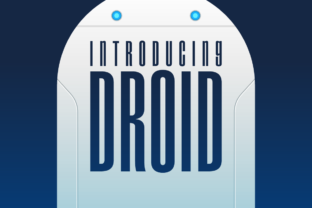
If you have ever scrolled through a design project and thought, "This needs something with a bit more futuristic energy," then you might just have found your answer. Droid is a stellar and space-themed sans serif font that brings a clean, modern edge to virtually any creative project. Crafted by typography whiz Typodermic, this free font has become a go-to choice for designers who want bold, readable type with a distinctly sci-fi personality.
What makes Droid stand out from the hundreds of sans serif fonts available today is its personality. It does not feel generic. It does not feel safe. Every letterform carries a subtle geometric quality that evokes starships, space stations, and digital interfaces, without ever crossing into gimmicky territory. That balance is rare, and it is exactly why so many creators reach for this typeface when they need something that feels both professional and imaginative.
Why Droid Works Across So Many Projects
One of the strongest reasons to consider Droid for your next design asset is its versatility. Because it is a sans serif font with clean lines and consistent stroke width, it reads well at almost any size. Whether you are working on a massive poster or a small social media graphic, the letterforms hold their shape and stay legible. That kind of reliability is hard to find in a display font, let alone a free one.
Here are some of the most common use cases where Droid really shines:
Brand identity and logo design — The geometric structure gives logos a techy, forward-thinking feel that works especially well for startups, gaming studios, and tech companies.
Poster design and editorial layouts — Pair Droid with a complementary serif font for headlines, and you instantly get a layout that feels polished and intentional.
Web design and digital products — Its clean sans serif structure loads fast and renders clearly on screens, making it a practical pick for UI text and hero sections.
Packaging design and merchandise — The space-themed aesthetic translates beautifully onto physical products, from coffee mugs to apparel.
Social media graphics and invitations — Droid adds visual interest without overwhelming the message, which is exactly what you want when you have limited space to work with.
Pairing Droid With Other Typefaces
Font pairing is one of those skills that separates amateur designs from professional ones, and Droid makes it easy. Because it has such a defined character, it pairs naturally with typefaces that offer contrast. A classic serif font can ground the futuristic energy of Droid and create a sophisticated tension that looks great in editorial design. If you prefer staying within the sans serif family, try pairing it with a handwritten font or a script font for a more playful, layered look.
The key is to let Droid do what it does best, which is command attention, while letting your secondary typeface handle the supporting role. That kind of hierarchy makes every design feel more intentional and more polished.
Practical Tips Before You Download
Before you add Droid to your design assets, take a moment to check a few things. First, review the license. Typodermic offers this font for free, but always confirm that the terms match your intended use, especially if you are planning any commercial work. Second, test readability at the sizes you actually need. A font that looks amazing at 72 points might struggle at 14 points, so do a quick mockup before committing. Finally, experiment with font pairing early in your process. The right combination can elevate a good design into something truly memorable.
Modern typography is not just about picking something that looks nice. It is about choosing typefaces that support your message, reinforce your brand identity, and create visual consistency across every touchpoint. Droid gives you a head start on all of that, and it does so without costing a dime.
If you have been searching for a creative font that balances personality with practicality, Droid deserves a spot in your toolkit. It is the kind of typeface that makes designs look more professional without demanding a steep learning curve. Give it a try on your next project, and you will quickly understand why so many designers keep coming back to it.